Macs are Hot

I ended up signing out a Mac from work last week. It’s an older Core Duo era MacBook Pro. It’s quite slick, and since I’m used to working in Linux, it took me no time at all to feel right at home. (Except that there’s no /proc partition… When Linux is all you use, you forget that it’s specific to Linux.)

It’s exactly what a computer should be: my first laptop was a huge clunker, so I thought my Thinkpad was amazingly sleek when I got that. But this has outdone that, and is still quite slick. The video card isn’t total junk (I’m driving a second monitor at 1920×1080, with all the fancy graphic effects), the speakers are actually pretty good, the keyboard is really comfortable and backlit (!), the screen is bright, and so on. The MagSafe power cord is slick, too: I’ve rolled over it twice in my chair already, and it simply pops out, rather than pulling the laptop onto the floor. Plus it makes it really easy to plug in: as long as you get the cord pretty close, it’ll pop right in.

But despite all this, I was actually being more literal in the subject of my post. On the left hand side of hte laptop, over the speaker, I find that I rest my hand when I’m not typing. And it’s very warm. Not quite uncomfortably hot, but remarkably warm. I also wouldn’t want to use this laptop on my lap, because the bottom gets pretty warm. But then I discovered that the thin strip of metal right above the function keys (F1-F12) gets insanely hot.

I installed iStat Menus, a slick plugin showing stats on all the hardware sensors. My CPU is running at 65 degrees Celsius, and I’ve seen it north of 70. The GPU is at 59, the GPU heatsink is at 64, and the memory controller is at 57. (The heatsink is warmer than the GPU itself?) After some poking around online, I think I figured out the problem: the fans in the case vent right by the metal strip above the function keys. iStat Menus shows the fans are running at 1000 RPM, though they’re inaudible. I’d really prefer they sped up a bit… Now I’m up to 72 Celsius.
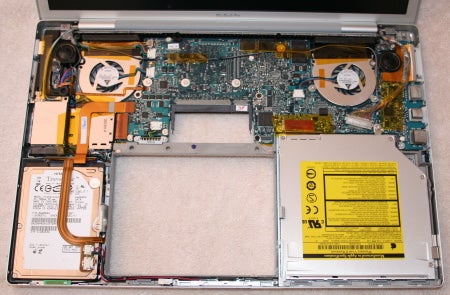
My other major pet peeve is that the battery life is abysmal. Something like 45 minutes. I’ve “calibrated” the battery, too, though it seems as if that simply helps it more accurately predict runtime. It’s at something like 400 charge cycles, which isn’t that much for a machine that’s a couple years old. My old Thinkpad still runs for several hours.

Still, though, I’m pretty impressed. If this were mine to keep I’d probably buy a new battery, but as it is, I tend to work plugged in anyway.

Weekend Tech Deals

A handful of good deals this weekend, too:

  • Acer 23″ LCD, 1920×1080, $220. I was actually ogling this same one at Newegg, where it’s $10 more. It has stellar reviews at Newegg. If you’re just looking for a new LCD, Staples has an 18.5″ for $99.98, though it’s only 1360 x 768. (It’s considerably more at Newegg, and has no reviews.) Or, a ridiculous deal, a 22″ Acer for $49.99, though it’s hopelessly backordered. I paid the $14.99 shipping and it’s expected in stock between 3/14 and 3/28. I don’t have high hopes for this actually being delivered, however; seems like it’s an outlet close-out, so it wouldn’t make sense for them to order more.
  • I could use bigger hard drives all around. Notebook SATA drives? Staples has a 250GB 2.5″ SATA disk for $70, albeit only 5400 RPM. $10 more gets a 320GB notebook drive, though also 5400 RPM. Or hit up Best Buy for the granddaddy of ’em all, a 500 GB notebook drive, $125.
  • Staples has the HP Mini Notebook for $300.

SPF

On the off chance that this affects anyone, I’ve gone through and published SPF records for all domains where I host DNS. It’s something I should have done a while ago, but I was spurred into doing it today after I noticed what seems to be a lot of backscatter from non-existent users, meaning that someone sent spam pretending to be ttwagner.com.

For those who don’t follow mailserver and DNS news, SPF, short for Sender Policy Framework, allows a DNS server to publish a TXT record (fairly obscure outside of SPF) specifying what servers are allowed to send mail from that domain. Normally anyone on the Internet could send mail claiming to be from n1zyy.com or ttwagner.com, but I now have SPF records stating that only 64.191.108.120 is allowed to send mail for these domains. I’ve gone a step further, and added null records (no one is allowed to send mail) for some domains I have that don’t send any e-mail.

“Good” mailservers will now check for an SPF record when mail is sent, and refuse mail forging any domains hosted here. I’ve set a really short (240-second) TTL, so I can change this in 4 minute’s time if need be.

Virus Notifications

At work, I’ve been getting lots of Hallmark E-Cards. They include a file, postcard.zip, which extracts to postcard.exe. Of course, as soon as an address not owned by a real human got an e-card, I knew something was up, but since I was on Linux, I wasn’t terribly afraid of it infecting me.

NoVirusThanks.org describes it in more detail, but the short version is that, after you’re infected, it will e-mail itself around, presumably to people in your address book. (It also gives the virus’s creators control of your machine.)

When the mail is being sent, it identifies itself with the HELO string of hallmark.com. They went pretty far with this one, since few people would think to check the headers. (Though those that do probably wouldn’t be opening a .exe file e-mailed to them anyway.) The IP it uses to connect can’t be forged, though. And this is where my idea is born.

There ought to be a site out there that’s just a giant database of IPs that have sent viruses, what virus they sent, when, and what IPs reported it. It’d be nice for blacklists (it looks like the infected machine sends mail directly, instead of using your normal mailserver), but what I really would love is to see some high-volume sites (I’m looking at you, Google) display a, “12 mailservers have reported your machine is infected with a virus in the past 24 hours” banner, along with a link that shows what virus(es) are reported, and help on reputable anti-virus solutions.

It’s a little creepy and big-brotherish, but it seems odd to me that I know a handful of IPs sending viruses, whereas the people who use those IPs probably have no idea. I have no way of contacting them, though, nor would an e-mail from some random guy saying “You have a virus” be that helpful.

Grapes of Wrath

I can’t say I’ve ever read Steinbeck, but based on a few Youtube videos, I’m pretty sure I get the idea.

The is probably one of the top 100 videos on Youtube, to the point that a local radio station sampled the sound she makes and I think I was with most listeners in cracking up, knowing exactly what it’s from. Sure, I feel kind of bad laughing, especially since it’s totally something I’d do. But her transformation from a professional newswoman to someone falling out of a pit of grapes and making sea lion sounds is astonishing.

If you take it as an isolated incident, it seems that it’s her, and not a vicious grape attack. But you begin to get the real picture of just how dangerous grapes are in a video aptly named Grape Safety Fail. The problem is that he fails basic grape safety: staying far, far away from grapes.

I Should be Mayor

I’ve got my police scanner on, and overheard the snow plows in Manchester discussing that there’s a parking ban in effect due to the snow. From the sounds of it, a lot of people either don’t know or don’t care.

Being a geek, instead of thinking, “I don’t live in Manchester, so I don’t care at all,” my first thought was, “The city should really have a Twitter account to disseminate information like this.” Technology would also make it pretty easy to send e-mail (or SMS!) blasts to residents. I’m sure most people wouldn’t use it, but the overhead would be minimal. And a city using Twitter to communicate would probably get enough press such that local residents who used Twitter would start following the city’s account.

But alas, I’m not a mayor, so I’m resigned to posting on my blog about how Twitter could help snow plows.

Spammers get profound

“Hi there, It has been long time since we did not meet.”

It goes on to pitch me some sort of medical site, but I can’t help but think that “It has been a long time since we did not meet” would be a memorable line in a poem or something. But instead, it’s trying to hock me their meds.

Sorry, cindy88, it’s going to be even longer until we don’t meet. Whatever that means.

Corporate Charity

A lot of companies give to charity, and it’s a great thing. Some match what their employees donate, and others just donate some of their profits to charities.

But a trend that drives me insane is when companies ask if you want to donate money to them to donate to charity. The “Product Red” campaign is a great example. It seems that you can pay, say, $50 extra on a product, and have $25 donated to charity. Plus, I’m sure the company receives a tax advantage when donating your money.

It’s sort of like the telemarketers for charities, which are usually run by companies that skim at least 50%, if not more, of your donation. In a way, they’re doing a great thing, but bringing in record donations to charity, simply by getting people who wouldn’t seek out a charity to donate. But at the same time, I can’t help but think that companies letting customers donate, indirectly, to charity are doing something insidious. Instead of giving a company money to donate to charity on your behalf, give it directly.

Review This Build?

I’ve been thinking of building a new desktop… I was hoping for some peer reviews to see if I’m missing anything. I’m not positive what this will run, but I’m trying to favor OSx86 hardware in case. This machine will probably house some virtual machines, hence the quad core and generous RAM. I’m not going dual monitors yet, but I’m trying to find a video card that will support dual monitors.

  • Gigabyte GA-EP45T-UD3P motherboard. (Onboard SATA RAID, dual GigE, USB and Firewire.) It only supports DDR3.
  • Intel Q9400, quad-core 2.66 GHz, 6MB cache. It’s about $40 more than a Q6600, which I think is worth it.
  • 2x of these 2x2GB DIMMs, for a net of 8GB RAM. Substantially cheaper than some of the other RAM out there.
  • Zalman CPU Cooler. I’m not planning on overclocking, but I think a CPU heatsink is an area to pay for quality. Comes with thermal grease.
  • Asus EN9800GT video card, aka a Radeon 9800GT. On the OSX 10.5.6 compatibility list, and pretty fast. I know there are better cards out there, but I don’t intend to do much intense gaming. Looks like this card will support dual monitors at some point.
  • A pair of 640GB SATA disks, to be mirrored. I wanted RAID 1+0 across 1TB drives, but I’m trying to keep the price down.
  • The Asus 21.5″ LCD I blogged about the other day. 1920×1080 will be a nice step up.

I plan to re-use my old case and power supply (300W), along with the DVD drive, keyboard, and mouse. Thoughts?