Building a Macintosh

At work, I came to be a Mac fan. It’s based on BSD, but adds a much more polished GUI. It’s got a very user-friendly interface, and yet it’s trivial for me to pull up the command line and do “real” things there. So when I decided to build a new desktop, I decided I wanted to build something that would run OS X. Unfortunately, Apple’s hardware is ludicrously expensive, and I was on a budget. The good news is that you can build your own!

It used to be that you had to download a “cracked” version of OS X, which had a bunch of patches applied to make it run on non-Apple hardware. Now, though, the tweaks occur elsewhere — some minor changes to the bootloader, and a couple kernel modules to do the rest. The install process wasn’t too convoluted, and the result was well worth it:
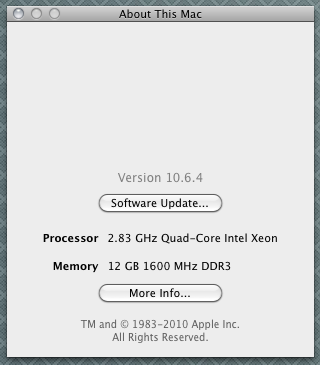
It’s not actually a Xeon, but that’s okay.

Here’s what I used for hardware. I tried to stick to things that were fairly close to the hardware Apple uses, to ensure compatibility:

  • Motherboard: Gigabyte EX58-UD5. NewEgg hasn’t carried it in a long time. I got mine somewhere else. This is one of the few components that you have to be careful about, verifying them with hardware compatibility lists.
  • CPU: Intel i7-930, a quad-core 2.8 GHz processor with plenty of cache.
  • CPU cooler: I’m used to my laptop running hot, so I went overboard and bought a huge Zalman cooler.
  • Graphics: I went for an EVGA-branded GeForce 9800GT, because it’s easy to get working. This and the motherboard are the two main components to watch for OS X compatibility. A fairly simple “enabler” script brought me from crappy VESA display to dual displays at 1920×1080, with 3D acceleration. I was going to skimp on the video card, but Kyle convinced me that I’d regret it. Within a couple weeks of building the system, Steam launched a Macintosh client, so I was in business playing TF2. The card runs great.
  • RAM: 6x 2GB DIMMs. I went for these OCZ sticks. The RAM ended up costing me more than any other component, but I’ve spent pretty much my entire life wishing I had more RAM. It’s really great to have more than enough. I probably would have been okay with 6GB, but in my experience, 4GB is inadequate, and I wanted room to grow.
  • Hard drive: I should have bought an SSD, in hindsight. But I was trying to keep the cost down, and I was used to having inadequate disk space, so I sprung for a 2TB SATA disk. At 5400rpm, it’s a slow performer, but I don’t do anything too disk-intensive. Some day I may pick up an SSD for the OS, applications, and the portion of my home directory that isn’t 75GB of photographs or 10GB of music or 250GB of backups.
  • Bluetooth adapter: this little AZiO adapter fits in one of the myriad USB slots, protruding only a minuscule amount, powering my Bluetooth mouse. I was concerned about Mac support, and the reviews are full of people complaining that it doesn’t work on Windows 7. But it’s plug-and-play on the Mac.
  • Case: I got a nice big, roomy Zalman case. It’s kind of a ludicrous amount of money for a case, but I think it’s well worth it to have a really quality case. Little details, like slide-in rails for the power supply — or the fact that the power supply is the bottom and not the top — plus tons of hot-swap bays on the front — make it a pleasure to work with. The USB ports on the top front are a nice touch, too.

I have an actually-legally-purchased copy of OS X. I used the digital_dreamer install scripts, which required having an already-functioning Mac. Luckily I had a Mac laptop. I connected the hard drive via USB (about the thousandth time that I realized my USB-to-IDE/SATA adapter was a great purchase) and formatted it properly, did a retail install of OS X to the drive, and then ran a script to patch in the requisite drivers. Then I plunked the drive into my new machine, booted it up, downloaded the latest OS updates, and ran a couple things like the “enabler” scripts for my Ethernet cards and the graphics. Now it runs superbly well; the only thing I lack is a sleep mode. I think that’s easy to fix, actually, but I haven’t bothered yet.

For fun, a few photos of the build.

This kind of amused me. The processor came in a huge package. In the course of removing the heatsink, this little silver square fell out. The little silver square, of course, is the processor:

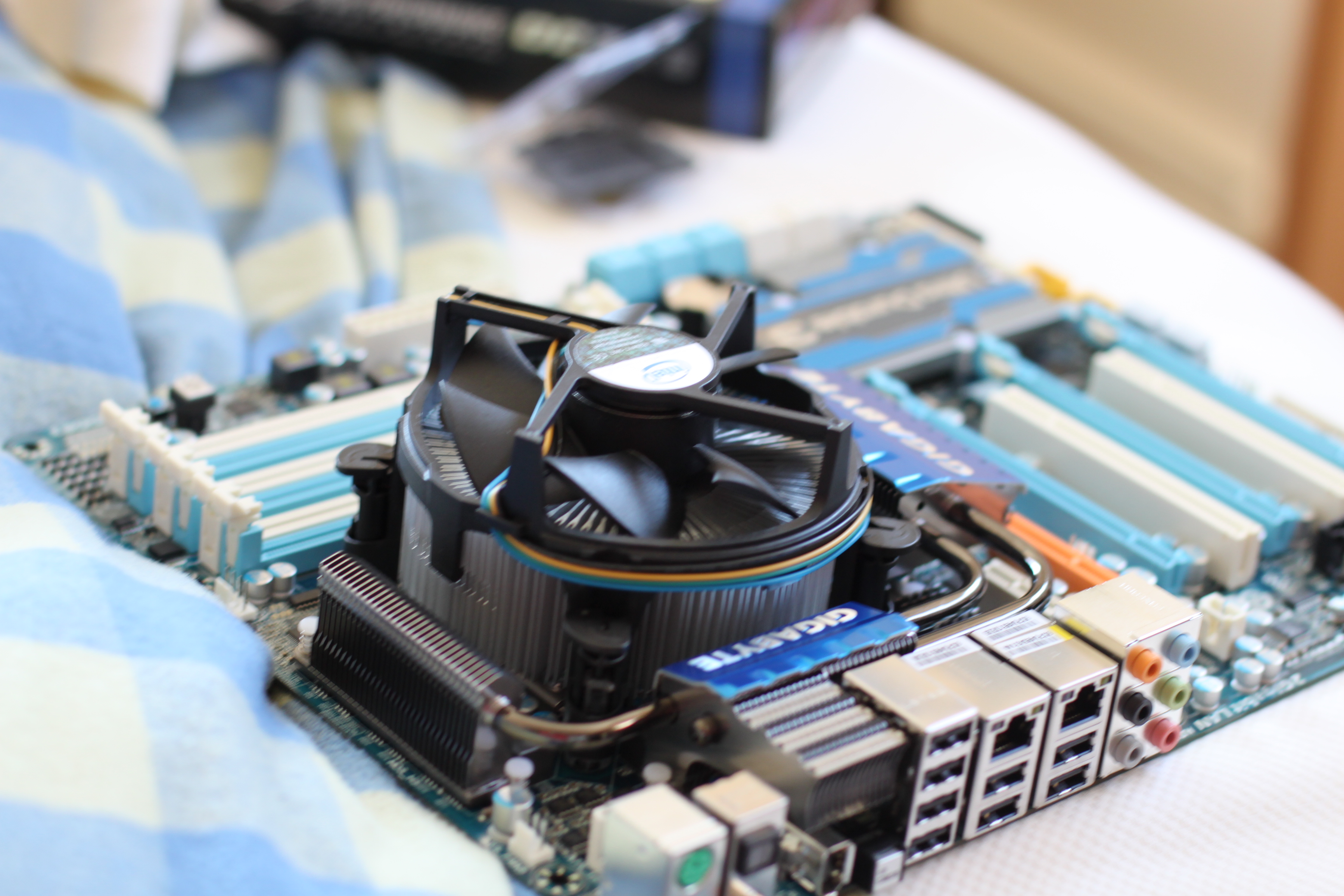
Here’s the motherboard fitted with the processor and the default heatsink:
But I didn’t trust that fan. Here it is with the Zalman cooler installed. (Yes, the protective plastic is still on. This was a dry fit, before everything was mounted. Yes, I remembered to remove it when I installed it for real.)
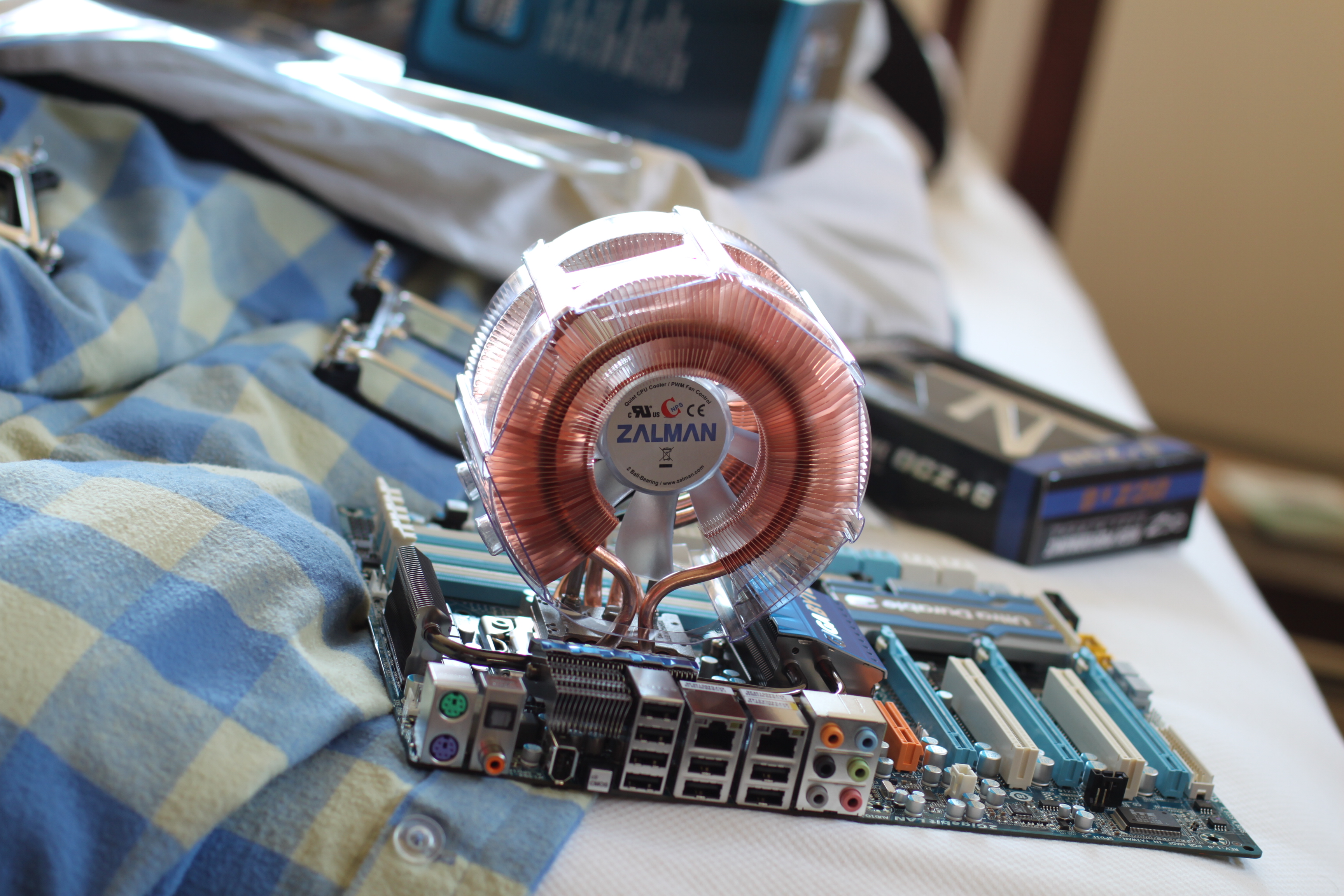
Quite a bit larger. Good thing I got a roomy case.

I’ve been quite happy with the setup, and I’d highly recommend it.

Photoshopped Art

I tend to be a Photoshop purist — you can use Photoshop to perform minor technical fixes. Correct white balance, enhance contrast, crop the shot a big tighter. Sometimes I think minor things are okay — in a portrait, it’s okay to clone out a cell tower in the background, or in an artistic landscape shot, it’s okay to clone out the litter. But I’ve never been fond on the ultra-tacky practice of applying random Photoshop filters and calling it art.

Consequentially, I have pretty mixed feelings about the Cutout tool. On one hand, it creates stuff that looks pretty good on its own. On the other hand, I don’t know that snapping an uninspiring photograph, applying a basic Photoshop filter and sliding a dial constitutes art. I’m pretty certain it doesn’t, in fact. But at the same time, I like these:

Nashua River

Mobilgas Sign

Thinking Like an Engineer

Lately a lot of my work as a web developer has been way at the back-end, and, for whatever reason, it tends to focus heavily on third parties. I spent a while fixing a bizarre intermittent error with our credit card processor, moved on to connecting with Facebook, and am now working on a major rewrite of the API client we use to talk to our e-mail provider. Sometimes it starts to bleed over into my personal life.

This kind of turned into crazy-person babble, but I haven’t posted in a while, so here goes a perhaps-horrifying look into how my mind works:

  • Driving home one night, I went through the FastLane / EZPass lane, as I often do. Only this time, instead of thinking, “I hate that I have to slow down for this,” I started thinking about latency. Latency is one of the biggest enemies of people working with third parties. It was at the crux of our problems with the credit card processor — we’d store a card and immediately try to charge it, when sometimes we had to wait “a little bit” before the card was available throughout their system to be charged. So I had to introduce a retry loop with exponential backoff. The email API work has major hurdles around latency and timeouts. We’ve moved almost all of it into a background queue so that it doesn’t delay page load, but even then we have intermittent issues with timeouts. So driving through the FastLane lane today, I slowed to about 45, and thought how remarkable it was that, even at that speed, it was able to read the ID off my transponder, look it up in a remote database somewhere, and come back with a value on what to do. I’d have assumed that they’d just queue the requests to charge my account, but if my prepaid balance is low, I get a warning light shown. It seems that there’s actually a remote call. It’s got to happen in a split-second, though, and that’s pretty impressive. I wonder how they do it. I thought a lot about this, actually.
  • I work on the fourth floor of a building with one, slow elevator. A subsection of Murphy’s Law indicates that the elevator will always be on the exact opposite floor: when I’m on the first floor, it’s on the fourth, for example. So one day while waiting for the elevator, I started thinking that it needed an API. I could, from my desk, summon it to our floor to lessen my wait time. Likewise, I could build an iPhone app allowing me to call the elevator as I was walking towards it. The issue of people obnoxiously calling the elevator way too early seems like a problem, but I think it’s okay — if you call it too soon, it will arrive, and then someone else will call it and you’ll miss out entirely. It’s in everyone’s interest to call it “just right” or err on the side of a very slight wait.
  • While thinking more about the elevator API, I started thinking about how elevators aren’t really object-oriented. (I’m pretty sure that’s never been written before.) It seems an elevator is really pretty procedural, running something like goToFloor(4). The obvious object would be Floors, but that’s not really right. You’re not adding Floors to the building, or even changing properties of Floors. The object is really CallRequest, and it would take two attributes: an origin and a direction. “Come to floor two, I’m going up.” It made me think that there are some places that being object-oriented just doesn’t make a ton of sense.
  • You really want to add authentication. To get to our floor, you need to swipe your badge. The elevator API needs to account for the fact that some requests require validating a user’s credentials to see if they’re authorized to make the request they are.
  • “Code an elevator” would actually be an interesting programming assignment. But I fear it’s too far removed from most normal coding. I started thinking that you’d want to sort CallRequests in some manner, use some algorithms, and then iterate over CallRequests. I think you actually want to throw out that concept. You have a tri-state to control direction: Up, Down, and Idle. Then you have two arrays: UpwardCalls and DownwardCalls. They don’t even need to be sorted. As you near a floor, you see if UpwardCalls contains that floor. If so, you stop. If not, you continue. If you’ve reached the highest floor in UpwardCalls, you check to see if DownwardCalls has an elements. If so, you set your direction to Down and repeat the same procedure for DownwardCalls. If there are no DownwardCalls, you set your state to Idle. The problem is that this is really not how I’m used to thinking. I want to iterate over CallRequests as they come in, but this means that the elevator is going all over the place. The person on the 4th floor wants go to the 2nd, so we make that happen. But right as they put that request in, the person on the 3rd wants to go to the 1st. So you’d go 4 to 2 to 3 to 1. “Fair” queuing, but ridiculously inefficient. On your way from the 4th to the 2nd, stop on the 3rd to pick the person up.
  • I wonder how things work when you have multiple elevators. In big buildings you’ll often have something like 8 elevators. I’m far too tired to try to figure out the ideal way to handle that. They need to be smart enough to have a common queue so that I don’t have to hit “Up” on all eight elevators and just take whatever comes first, but deciding what elevator can service my request first is interesting. I kind of think it’s another case of elevators not being the same as the programming I’m used to, and it’s just whatever elevator happens to pass my floor in its service going in the right direction. But what if there’s an idle elevator? Can it get to me first, or will an already-running elevator get there first? Do you start the idle elevator first and make it event-driven? What if the already-running elevator has someone request another floor between its present location and my floor? You’d need to recompute. You’re probably better off dispatching an idle elevator and just giving me whatever gets there first.
  • You then need to figure out what’s important. If you have an idle elevator that can get to me more expediently than an already-running elevator, but the wait time wouldn’t be that much longer, do you start up the idle elevator, or do you save power and have me wait? How do you define that wait? Is this something elevator-engineers actually tune?
  • I think you want to track the source of a request — whether it came from within the elevator or from the external button on a floor. If it’s within the elevator, you obviously need to stop, or the elevator has effectively “kidnapped” the person. But if it’s an external button, you might want to just skip it and let another elevator get to it, if you have a bunch of CallRequests you’re working through. Ideally, you’d also approximate the occupancy of the elevator based on the weight (from reading the load on the motors?), and when the elevator was at perhaps 75% capacity, stop processing new external requests.
  • Should the elevator controller try to be proactive? It might keep a running log of the most “popular” floors out of, say, the last 50 CallRequests, and, when it was done processing all CallRequests, go to whatever the most popular was and sit idle there? Or perhaps it should work its way towards the middle floor? If you had multiple elevators you could split them apart that way. Is it worth the power conservation?
  • The office thermostat should have an API, too. (I bet the good ones do. But we don’t have those.) Thermostats are a pain to use. readTemperature and setTemperature are the obvious API calls, though advanced thermostats would have a TemperaturePlan concept.

Fuel Efficiency

I found out a while ago that buses tend to get less than 10 miles per gallon. Initially, that seemed appalling. But I then got to thinking about the number of passengers, and figured that, in terms of efficiency and environmental impact, you should really multiply the number of passengers by the fuel efficiency. My car gets about 20MPG, but if I carpool with someone who also got 20MPG when they drove, in a strange way, we’re at 40MPG. It turns out that the term for this is “passenger miles per gallon.”

So then I wondered how different modes of transportation compared. I happened across one of Wikipedia’s many strange articles, Fuel efficiency in transportation, which told me much, much more than I wanted to know about the matter. It’s hampered by the fact that it uses many different units of measure interchangeably. (Megajoules per kilometer?!)

A bus is stated as getting 200-300 “passenger miles per gallon,” which seems pretty respectable.

CSX advertises that their trains move a ton of freight 426 (?) miles on a gallon of fuel. It turns out that this isn’t even a good number, it’s just the industry standard. A casual observer might not notice the “ton of freight” qualifier, though. The Association of American Railroads claims an industry average of 457 ton-miles per gallon, which is the unit CSX is using. (Actually, based on that, CSX is below industry average?) Strictly in terms of “distance on one mile of fuel,” trains seem to get 1-2MPG on average. A fully-loaded train, though, can carry hundreds of passengers; a Colorado rail line is stated as getting close to 500 passenger-miles per gallon.

Airplanes seem to need several gallons of fuel per mile, implying less than one mile per gallon. But multiply by the number of passengers and you can get close to 100 passenger miles per gallon. (For a full jet. A private jet carrying a handful of passengers is much lower.)

How about boats? I’ve read about bunker fuel used on ships, which is apparently literally the bottom of the barrel, a sort of sludge that needs to be heated before it’s even a liquid, and its absurdly bad environmental impact. But maybe boats are efficient?

My goodness, no. The Wikipedia article only cites the Queen Mary 2, which is perhaps not a representative sampel. But it uses one gallon of fuel to move 41.2 feet, implying about .008 MPG. (?!) It can hold 1,777 people, for 13.9 passenger-miles per gallon. That’s still appalling.

MySQL Replication – Permission Denied Errors

I spent a long time beating my head against the wall trying to solve this, so I thought I’d share it here in the hopes that it helps someone else.

I picked up a very cheap VPS to serve as a backup for various services, and decided to use it as a MySQL slave for backup purposes, and to provide secondary DNS (with a MySQL backend). Despite having no problem maintaining a kind-of-complicated cluster of MySQL boxes at work, I could not for the life of me get basic replication running. It consistently failed:

100829 15:56:56 [ERROR] Slave I/O thread: error connecting to master 'replication@127.0.0.1:7777': Error: 'Access denied for user 'replication'@'localhost' (using password: YES)'  errno: 1045  retry-time: 60  retries: 86400

(Yes, 127.0.0.1 is the master. Port 7777 is an ssh tunnel.) I tore my hair out, and repeatedly dropped and re-created the replication user. I could connect by hand. I tripled-checked credentials. It just didn’t work. Some people advised that master.info was sometimes saved with incorrect information; I blew that file away and re-issued the CHANGE MASTER command. Still nothing.

Finally, someone mentioned an oddity they discovered: with long passwords, replication just refused to connect. I’d used my favorite method of assigning passwords: “head /dev/urandom | shasum” So I changed my password to ‘password’ (just for testing!), flushed privileges on the master, changed the password with CHANGE MASTER, and started the slave again. Viola.

This wouldn’t be nearly as annoying if I could find it documented anywhere. I would argue that it’s a bug. But there it is — shorten your password. (12 characters is the limit I’ve seen put forth.)

Live Scanner Feeds

Radio Reference is a popular website for (police) scanner enthusiasts. It offers a pretty revolutionary concept: enthusiasts hook their scanners up to computers which relay the traffic to RadioReference’s servers, which host them as Shoutcast feeds. (I would also argue that the site is the best resource out there for scanner frequencies, and there are also forums that comprise what I can only assume is the world’s largest scanner-related community.)

For some inexplicable reason, I ignored the Live Feeds for a long time, until I got an iPhone and discovered an abundance of “police scanner” apps that were built on top of those feeds. The feeds are quite popular — the site’s owner posted a blog entry showing his latest AWS bill, which shows about 14TB of incoming traffic and more than 35TB outgoing traffic.

Besides being really valuable for those who simply don’t own a scanner, some of the feeds provide audio that is out of reach for most people. I could easily listen to the LAPD, for example, despite living thousands of miles away. There’s now a feed for Mass State Police in the area; I own a scanner capable of receiving them, but their signal is very weak where I live, so it’s advantageous to listen over the Internet, despite a bit of lag. Waltham has a feed of its own (well, plus Newton Fire). Someone else provides a Merrimack Police feed, which is advantageous because it’s a digital voice (P25) signal and a capable scanner will run you $500.

Boston Police are conspicuously absent, even though a lot of smaller cities have feeds. It seems that there’s considerable interest in setting one up, but to date, no one has. (I’d love to myself, but I have very poor reception here — part of the reason I want a BPD feed in the first place!)

In any event, I’d recommend checking the feeds out. You can listen in with a browser, or use one of many smartphone apps.

Special Interests

If anyone has ever doubted that special interests were out of control, here’s proof: the National Association of Broadcasters and the RIAA have proposed legislation that would require all cell phones to contain FM radios.

I’m not really sure why I would want an FM radio on my iPhone, when I have over a thousand of my favorite songs on it, or when I can just pull up Pandora and stream music tailored specifically to my tastes. This isn’t to say that having an FM radio on a cell phone wouldn’t be cool, just that making it the law seems rather absurd.

Gary Shapiro, the CEO of the Consumer Electronics Association, blasted the idea as “the height of absurdity” and said something everyone has thought about the RIAA for years: “Rather than adapt to the digital marketplace, NAB and RIAA act like buggy-whip industries that refuse to innovate and seek to impose penalties on those that do.” FM radio and the RIAA are yesterday’s news, and they don’t even seem to be aware of it.

My favorite part of the article, though, is the paraphrased argument from a NAB executive: “Most Web-based music services don’t include emergency alerts that radio stations broadcast, he said. Requiring FM receivers in mobile phones would help better inform the public about emergencies or bad weather nearby, he said.”

Without realizing it, he proves once and for all just how out of touch they are. I have the Internet in my pocket, and can be reached instantly 24/7. In the middle of a sandwich shop, I can pull a device out of my shirt pocket and check the weather radar. While waiting in line for the train, I check the news. They look around and see people connected like never before, and what they conclude is apparently, “Those poor people have no way of knowing about major emergencies. What they need is FM radio.”

New Main Page Theme

It seems I do this often, but the main page was getting ugly to look at it. I replaced it with another theme. It’s obviously still got some styling issues and some places where I haven’t changed the default text that came with the template I bought… But I’ll get to that in time. 🙂 Image display isn’t working yet. I’m thinking of switching back to showing the full text of posts instead of truncating to a few hundred bytes. Any opinions?