A Poll

Last Wednesday (the 9th), I ordered a new pair of sneakers off of eBay. (They’re new, from a trusted seller, and they’re similar to what I had previously, except not falling apart, before you think I’m too weird.)

On Friday, I started to think that they should be showing up. On Saturday, I figured it was time they’d arrive. On Monday of the next week, I was sure they’d be there. By Tuesday, I was disappointed.

On Tuesday I got an e-mail saying that they’d be shipped the next day.

Today I got an e-mail that they had been shipped.

Assuming (maybe it’s too soon to make these assumptions…) that they arrive and haven’t been damaged, what do I do about feedback? Good feedback so they won’t retaliate and leave me negative feedback? Or do I be a jerk and leave them “Neutral” feedback, saying, “Took over a week before they were shipped to me?”

Stats

For the longest time, I’ve wanted a background process that would just increment a counter with each keystroke. A friend here (who has the exact same laptop I do) commented on how it was kind of scary that all of my keys had become really shiny and worn down from use. I couldn’t even give you an order-of-magnitude guess of how many keys I’ve pressed since the life of the laptop.

But that’s all changing. A friend had sent me a link to a site called WhatPulse before. It’s essentially… a background process that counts keystrokes and also measures how far your mouse has moved. Concerned about possible privacy implications, I immediately installed it.

Here’s my profile. It’s probably quite inaccurate right now, as I didn’t install it until recently, when I did some Wikipedia cleanup, which is probably 90% clicking, and of the remaining 10% typing, about 95% of that is copying-and-pasting templates and such. So clicks are artificially high, while keystrokes are artificially low.

After a few days’ time to normalize, I want to try to extrapolate this out over the lifetime of my laptop and see where I’m at. (I have a feeling I’ll be somewhat embarassed. Speaking of which, about 5,000 pageviews on Wikipedia for me now, since whenever I last reset my Firefox profile, which was not long ago. And I’m coming on 900 edits on Wikipedia, too.)

Uhhh

I’ve been working a lot on cleaning up Wikipedia in my free time the past few days. I think I might stick with it and eventually go for admin, which seems like a fun goal. (Although as they point out, it’s no big deal really… But it’d help me a lot.) A lot of my work comes from watching the Recent Changes page, following through to suspect changes, undoing their change, and going back.

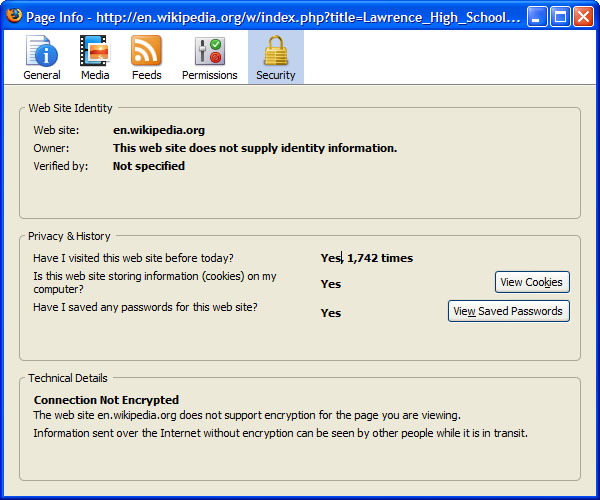
Anyway, entirely out of the blue I started to wonder if Wikipedia uses mod_gzip. So I pulled up Firefox 3’s “Page Information,” and saw the following. I felt slightly pathetic at the result. (Note that I’m sometimes on a page for less than a second, so it’s really not as bad as it seems, but still…)

title=”How many page views?!”>How many page views?!

Elevator Electricity Usage

I often take the elevator up a couple stories, or, worse, down a couple. It always seems like a waste, so I came to wonder how much electricity I was wasting.

It took a while to find, but the answer is: apparently, not much. Around 2 Watthours. This seems ludicrously small, lower than the new compact flourescent bulbs I just switched to. (Almost by an order of magnitude.) One interesting concept that might help achieve this number is regenerative braking: essentially ‘capturing’ the energy of the elevator moving downward. (Whether taking an elevator down actually contributes electricity to the system or not is unclear to me.)

In conclusion, see if I ever take the stairs again. (Well, unless it’s a weekend and some drunken jerk peed in the elevator again.)

Running a Meeting

One thing I can’t stand is meetings where people have no sense of purpose. Today we had a group meeting for the final project for one of my classes. No one was really going anywhere with it. We discussed a few ways we could split the assignment up.

So I did something that worked even better than I expected. I took a copy of the project description and suggested that we go through each element, outline possible ideas, but with a twist: after one minute of discussion on each element, we’d have to move on to the next one.

As always happens, we’d brainstorm an idea and someone would try (perhaps inadvertently) to derail the process. Someone thought we might want to consider handling one of the events we were discussion differently. So I put his way down, too. The two somewhat contradicted each other, but they’re both on the list. Later on, someone suggested that we needed to look more into an issue before proceeding. I agreed. So I put, “Research this!!” on the list and kept moving.

Not ten minutes later, we had an outline of the whole project. Very rough, mind you. But I’m pleased, because in the twenty minutes before that, we’d essentially each sat around staring into our computers, making a halfhearted attempt to think of how to split up the project. Now we had an outline of the whole thing.

What’s most awesome, though, is that this way of thinking ended up being contagious. We got through the outline, and it was time to split the assignment up. And this time, instead of a theoretical discussion about all the possibly ways we could divvy up the work, someone got up and put a list of the sections on the board, and we rapid-fire split them up. No discussion of, “Well, I think those two sections might go well together given the current alignment of the planets…” He just took two sections and assigned them to someone.

I don’t profess to be the best meeting-runner of all time, but why can’t more people run meetings this way? A meeting should be a place where people come together to share ideas before going their separate ways to work on individual sections. So focus on the parts that affect everyone, and leave the individuals to handle the mundane details.

And this is what I think is so neat about management. You’d expect a management major to be a heavy-handed leader. But the secret is to be an invisible catalyst helping things run smoothly. Done right, you needn’t even be recognized as a leader.

Counter-Vandalism

Today most of my tasks are in the “wait” phase, so I had some free time. Of course it’s a Sunday, so there wasn’t a lot to do. So I fell back on an old hobby: patrolling Wikipedia for vandalism. I’d say that 80% of edits are constructive, 10% are well-intentioned but misguided, and 10% are egregious vandalism. (Replacing a whole article with the word “poop,” for example.)

I’d like to point out that the deck is really stacked against vandals, though.

One of the most useful things is the Recent Changes page. Unsurprisingly, it shows the most recent changes to articles. Tweak the settings a bit, and I can view only changes by users who aren’t logged in, which probably accounts for 95% of vandalism. I can quickly click “diff” to view a summary of changes between the edit and the version before it, which makes vandalism quite evident. “hist” takes me to a history of all the changes, which is also useful. After that comes the change in length: (+1) indicates that the page was made one byte longer, for example. Huge differences are in bold; lengthy tirades inserted into the middle of an article, or outright “deletion” of articles, are super-easy to spot. (It’s worth remembering that all it shows is the net change of the edit: if you replace good text with obscene text of the exact same length, it’ll show a net change of “0,” so the size of the change shouldn’t be anything other than an occasional red flag that something’s up.) I get the user’s name (only IPs in the view I keep), followed by a link to their Talk page.

For example, I noticed a significant addition to the article on Jean Carne. Some guy kept inserting some sort of ramblings about her. Here’s a diff (obscene text). On the left is the “before,” and on the right is the “after.” The section in green is what got added, which clearly doesn’t belong.

Wikipedia allows logged-in users to include their own JavaScript, etc. into the pages they see, so I’ve got some mods to insert an “undo” option for me.

So it’s worth noticing that all of this took me maybe five seconds. That’s probably too high a number. I spotted a huge number of added content, saw the diff, noticed it was nonsense, and undid it.

But that’s only half the job. The next stage is to leave a note on the user’s talk page, explaining that you undid their edits. There’s a Wikipedia policy page on how to proceed, with a handful of useful templates. The basic premise is that they escalate from, “Your test worked and we undid it for you; next time please experiment in the Sandbox,” gradually growing in sternness until it gives a last warning: vandalize again and you’ll be banned. (Here’s an example, showing a guy who, frankly, got more warnings than he deserved.) You’ll note that, aside from vandalism earlier this month, it all happened in a short period–20:21 and he got his first warning, and by 20:39 he had been banned. What’s most awesome about this is that most of the time was him: we can’t warn someone again before they vandalize again.

However, I’m not an admin on Wikipedia, which means that I can’t actually ban anyone. But I don’t need to. There’s a handy page called Administrator Intervention against Vandalism, often referred to as WP:AIV for short. The use of a quick template allows me to identify a user or IP that’s actively vandalizing. My contributions rarely stay on the list for more than 30 seconds, after which time they’ve been acted on. I’ve never encountered a backlog, because there’s always an admin or twelve processing the list.

Another useful tool in our arsenal is the ability to view contributions by user. A fun bit of JavaScript allows me to simply hover over an IP / username and view their changes. So if I catch you vandalizing once, I’m going to go through your past edits. Most of the time your past vandalism was caught already, but periodically I’ll catch something.

There are two things worth noting:

  • It’s often under 30 seconds to go from a user vandalizing a page to their edits having been reverted and a warning left.
  • People patrol new edits pretty closely. I caught a guy today changing dates. They were subtle changes, but that doesn’t mean that no one caught it. Just as with people trying to trash pages, I had his edits undone in a matter of seconds.

There’s really something pretty satisfying with someone working up some sort of elaborate vandalism, only to undo it with a single click.
Richardson

The LA Times has an interesting article in which Bill Richardson suggests that he had intended to back Hillary, but between her overzealous TV ads and a bunch of unceasing, rude calls suggesting that he “owed” her the endorsement because he was on Bill Clinton’s cabinet, he decided otherwise. The Clinton camp, of course, has called his loyalty to President Clinton into question, but Richardson was unphased:

“I was loyal,” Richardson said during an extended conversation over breakfast this week at the governor’s mansion in Santa Fe. “But I don’t think that loyalty is transferable to his wife… You don’t transfer loyalty to a dynasty.”

The Clinton camp, though, is still fuming:

Days later, just when interest in the endorsement seemed to wane, former President Clinton exploded in a rant about Richardson at the state Democratic Party convention in San Jose.

Computing

It looks as if we’re actually being charged $500 to take our school laptops with us (after paying $1,200 for the “Technology Fee,”) which has me scouting out prices: can $500 buy something better than this?

In the process, I came across this: a tri-core computer.

If you’re confused…. Me too!

Group Collaboration

A huge amount of the stuff I do here involves working, online, with other people. I’m surprised at how technology really isn’t where I expect it. Here are some things I do often, and how technology helps me–or fails me.

  • Communicating with persistent groups. I’ve got a board of people who are taking over the club I run here. It’s one group of people, and it’s a “persistent group” — it’s always the same people. I created a mailing list on my server allowing group discussions: we e-mail one address and it goes to everyone. It works great, but we all go to the same school, and thus use the same e-mail service. Why can’t I create a mailing list for all of us? I really shouldn’t be reliant on us e-mailing a “special” address on a server in Texas so that nine of us in Massachusetts each get a copy. A good mailserver for big groups, e.g. schools or companies, ought to let its users create these groups on the fly.
  • Collaborative document editing. This one has two solutions I use:
    • MS Word + Track Changes: Two problems with this one… The first is that most people don’t know how to use it, and trying to communicate how to do it just adds one more thing to go wrong. The second is that “Track changes” doesn’t deal with concurrent edits: if I take a document and work on it, and you take it at the same time and work on it, there’s nothing to even try to merge our changes.
    • MediaWiki: I use the same software that powers Wikipedia to keep notes and lists for myself, as well as to enable better groupwork. We can each track who’s changing what, and it kind of supports concurrent editing, although if we edit the same section, one of us will still get an edit conflict.
    The thing is, the concept of, “You work on Part A, I’ll do Part B, and then we’ll integrate them and make it flow” is very common. It’s kind of disappointing that it takes quirky web apps to do this effectively. I’m not sure this one is a failure of solutions: I can think of numerous things that do it. The problem is just that no one uses them, no one knows how to use them, and none of them have very good name recognition.
  • Calendaring. Exchange supports this in theory, but no one uses it, and I’m still quite disappointed that no one has made a competitor. Google Calendar integrates with GMail nicely, but that doesn’t help for people who don’t use GMail… I want to be able to say, “I want to meet with these 5 people” and have the computer find times that work for each of us within certain constraints. I’ve invented what I call “shotgun scheduling,” which seems to work fairly well. I identify about five times that work well for me and sound like they would be good for other people, and then list them and ask each person to tell me which of them they can do. It eliminates the, “Well I have soccer practice from 2 to 3 on Wednesdays…” headaches. But this is something that technology could solve very easily, and one of the things I want most.
  • Group voting. Again, this is something that Exchange supports but that isn’t used too much. I think we should change the time on one of our events, but I don’t want to do it without running it by the rest of the group. But it’s a pain to send out an e-mail to all of them and then wade through all the responses. (With nine people it’s not a big deal. Imagine if there were 200.) Some things aren’t meant to be discussed, so much as given a quick thumbs-up or thumbs-down. A good e-mail service should support this, and make the results a web-based thing hosted on the server, not an e-mail based thing.
  • Group document repository. SharePoint (?) does this, but it hasn’t been rolled out to students. For an arbitrary “group” of people, I want to be able to upload, edit, and collaborate on documents.
  • Task/project management. Not a to-do list, but a system that supports tiers (i.e., subtasks), deadlines, priorities, statuses, “next steps,” and assignment of tasks. The ability to link a given entry on it to an e-mail thread or whatnot would rock, as would integration with the calendar solution. Out of 50 million task management solutions, I have a big list on my whiteboard. Nothing I’ve found works quite as well. Everything is either too complicated (I don’t want a Gantt chart of my homework) or too simplistic (I don’t want a single-level checklist for managing my more involved projects).
  • Contact sharing. This one has the technology there 100%, but the usage has fallen short. I’d love to be able to automatically retrieve contact information from various contacts and send it to my phone. vCard and such does this, and Outlook will sync right to my Treo. But not many people use this.

I think there are two conclusions to draw from all of this. One is that, in some places, technology is still lacking for some reason. Nothing I do is anything that millions of groups and teams across the planet don’t do, so it’s shocking in a way that technology is still absent in some places.

But at the same time, in some cases, technology is ahead of people. I think organizations essentially need to require that people use the tools. When a manager tries to schedule a meeting and finds that people don’t keep a calendar on the computer, he needs to address the issue with them. When I try to pull down contact information for my coworker and can’t find it, that should be an issue I bring up with him with a, “I can’t believe you’re neglecting your duties” tone. Some of these features have great importance, but we get stuck in a sort of catch 22: no one uses them because, well, no one uses them. It’s the classic network effect: as long as people don’t maintain a group calendar, no one has reason to use a group calendar.

Priorities

I find this image interesting for so many reasons.

The most obvious, and least interesting, one is that the laptop is engulfed in flames. It’s a Dell, and you may recall that stretch when a bad batch of batteries kept spontaneously combusting.

One of the bigger issues is the thought process. “Oh crap, my laptop is on fire. I’d better…”

I would think, “…try to extinguish it,” although, “remove the book practically on top of the flaming laptop” is valid too, as is, “…call 911 and get out of here!”

But instead, this guy thought, “…grab a camera!” I guess I’m glad he did, but it certainly wouldn’t be my reaction.

But above all else, what I find most interesting here is that he has a huge onion on his desk. I could see an apple, a nice snack for later in the day. Or maybe a pear. Or grapes. But this guy has an onion. A huge onion. Why? I refuse to believe that he intends to munch on it later in the day as a snack. It might be a decent ingredient in something else, except that he doesn’t seem to have anything else in terms of food. Just an onion. Why?!