Gnome’s Trash Folder

Gnome (the desktop environment, not the creepy garden fixtures) has a “Trash Folder,” which is the functional equivalent of the Windows Recycle Bin. This is slightly problematic for those of us who are used to file “deletion” on Linux instantly unlinking the file, who don’t expect that the files are being moved somewhere. Especially as the developers made the icon a little more obscure, putting it in the very bottom right corner of the taskbar, where I overlooked it for quite some time. Now that I know it’s there, it’s easy to purge, just like I empty the trash bin.

But for geeks like me, you’ll be happy to know that the “Trash Bin” is nothing more than a directory, ~/.Trash. Thus you can empty it fairly easily, with “rm -rf ~/.Trash/*”  And you can use all the routine Linux filesystem tools: “ls” to show what’s in it, and “du -sh ~/.Trash” to list its contents and show the total size.

Update: Newer distros are putting it in ~/.local/share/Trash/files/ instead of ~/.Trash

Flash Plugin for Ubuntu

In the hopes of helping someone else…  Ubuntu has two options for a plugin for Firefox to play Flash. There’s the open-source Gnash and “the real thing” from Adobe. Of course what Adobe provides is closed-source, so there seems to be a tendency to push Gnash. But having used Gnash, it’s awful. I give them enormous credit for their work, but when I have a load average of 2.5 playing a 2-minute YouTube video, get lots and lots of dropped frames, and have random 0’s (a big ‘zero’) superimposed over the video, it’s alpha-level code. It’s not usable.

In theory, Ubuntu makes it easy to install the proprietary one, too. They can’t distribute the player itself, per Adobe’s license terms. So they have a package, flashplugin-nonfree, which downloads it from Adobe. The problem is that Adobe updated their version, so the script fails, citing an MD5 mismatch. (The file’s signature has changed, since it’s, you know, a different version.) Worst of all, it doesn’t handle this error appropriately: it tells you that the package installed successfully, when, in actuality, it aborts due to the error.

This happened in early December. The Ubuntu developers have been squabbling, yet to release an update: apparently the new version doesn’t work in Konquerer. As one person on the developers’ list points out, status quo is the worst case: Flash doesn’t work for anyone. But the developers seem unwilling to use a simple patch to handle the new version, because then Konqueror wouldn’t work. So some grandiose task is under way to try to integrate it with Konqueror, apparently. Meanwhile, no one can use Ubuntu’s package manager to install Flash player.

Fortunately, it’s easy to do yourself. Download the .tar.gz file here, and extract it somewhere. Pull up a terminal, go into the extracted directory, and type “sudo flashplayer-installer,” and follow the on-screen instructions. It’ll take about fifteen seconds. When asked for the location, you probably want /usr/lib/firefox (assuming you use Firefox, and are on Gutsy). You have to close your browser to do this.

Easy Backups on Linux

It’s good to keep backups, especially of servers in remote data centers using old hard drives.

rsync -vaEz --progress user@remote:/path /local/path

In my case, I’m doing it as root and just copying /, although, in hindsight, I think I should have used the –exclude=… option… It doesn’t make any sense to me to “back up” /proc or /dev, /tmp is iffy, and /mnt is usually not desired.

A few notes: I use –progress because otherwise it wants to just sit there, which is irritating.

-a is archive, which actually maps to a slew of options. -z enables compression. Note that this may or may not be desirable: on a fast link with a slower machine, this may do more harm than good. There’s also a –bwlimit argument that takes KB/sec as an argument. (–bwlimit=100 would be 100KB/sec, or 800kbps.)

Using rsync for backups is nothing new, but it’s still not used as widely as it could be. A seemingly-common option is to create a huge backup with tar, compress it, and then download the massive file. rsync saves you the overhead of making ludicrously-large backup files, and also lets you just download what’s changed, as opposed to downloading a complete image every time. It’s taking forever the first time, since I’m downloading about 40GB of content. But next time, it’ll be substantially quicker.

With backups this easy, everyone should be making backups frequently!

MySQL

Sun bought MySQL.

Also, Sun’s CEO {has a blog, doesn’t know how to resize images other than changing the HTML attributes}.

Remember back when they were a little below $5 a share and I said I thought they were going somewhere?

Next time I’m putting my money where my mouth is. They closed at $15.92 a share on Friday.

Of course, some are wondering whether this was a good buy. Not necessarily whether MySQL is good (it’s perhaps the most widely-used database in the world), but whether it makes sense to pay a billion dollars for it, when it’s (1) primarily an OpenSource product, and (2) going to take something like 20 years of revenues to break even. While I don’t quite buy the bit about it being a conspiracy with Oracle to kill the project, you should check out the page they link to, Sun’s list of acquisitions. It’s so bad that Sun appears to have a photograph of a dumpster with the Sun logo on it. (Okay, it’s a shipping crate. But it doesn’t make a ton of sense, and you have to grant that it looks a little bit like a dumpster.) It reminds me of when Sun bought Cobalt for $2 billion, and Cobalt went belly-up shortly thereafter. (I still think RaQs could be hot sellers today, by the way, if they were still being made. To take a company doing incredibly well and have it go belly-up in under a year takes some incredible mis-management.)

DNS Dork

The real geeks in the room already know what the root zone file is, but for those of you with lives… DNS (Domain Name Service) is the service that transforms names (blogs.n1zyy.com) into IPs (72.36.178.234). DNS is hierarchical: as a good analogy, think of there being a folder called “.com,” with entries for things like “amazon” and “n1zyy” (for amazon.com and n1zyy.com, two sites of very comparable importance.) Within the amazon ‘folder’ is a “www,” and within “n1zyy” is a “blogs,” for example. A domain name is really ‘backwards,’ then: if it were a folder on your hard drive, it would be something like C:.com.n1zyyblogs.

Of course, this is all spread out amongst many servers across the world. When you go to connect to blogs.n1zyy.com, you first need to find out how to query the .com nameservers. The root servers are the ones that give you this answer: they contain a mapping of what nameservers are responsible for each top-level domain (TLD), like .com, .org, and .uk.

So you get your answer for what nameservers process .com requests, and go to one of them, asking what nameserver is responsible for n1zyy.com. You get your answer and ask that nameserver who’s responsible for blogs.n1zyy.com, and finally get the IP your computer needs to connect to. And, for good measure, it probably gets cached, so that the next time you visit the site, you don’t have to go through the overhead of doing all those lookups again. (Of course, this all happens in the blink of an eye, behind the scenes.)

Anyway! The root zone file is the file that the root servers have, which spells out which nameservers handle which top-level domains.

Yours truly found the root zone file (it’s no big secret) and wrote a page displaying its contents, and a flag denoting the country of each of the nameservers. The one thing I don’t do is map each of the top-level domains to their respective country, since, in many cases, I don’t have the foggiest clue.

What’s interesting to note is that a lot of the data is just downright bizarre. Cuba has six nameservers for .cu. One is in Cuba, one in the Netherlands, and four are in the US. Fiji (.fj) has its first two nameservers… at berkeley.edu. American universities hosting foreign countries’ nameservers, however bizarre, isn’t new. .co (Colombia) has its first nameservers in Colombia (at a university there), but also has NYU and Columbia University (I think they did that just for the humor of Columbia hosting Colombia).

In other news, it turns out that there’s a list of country-to-ccTLD (Country-Code Top Level Domain) mappings. I’m going to work on incorporating this data… Maybe I can even pair it up with my IPGeo page with IP allocations per country…

Stomatron

I’ve been working on my resume as I seek to apply for a job that’s a neat blend of multiple interests–managing web projects (even in my preferred LAMP environment), politics, and even a management potential. And as I do it, I’m remembering all the stuff I did at FIRST, and reflecting on how much better it could be.

I was “fluent” in SQL at the time, but didn’t know some of the neater functions of MySQL. For example, when I wrote the web management interface to the Stomatron, I didn’t know that I could make MySQL calculate times. So I’d retrieve a sign-in and sign-out time and use some PHP code to calculate elapsed time. This wasn’t terrible, really, but it just meant that I did more work than was necessary.

More significantly, I didn’t know about the MySQL query cache. (Actually, I don’t know when it was introduced… This was five years ago.) Some of the queries were quite intense, and yet didn’t change all that often. This is exactly where the query cache is indicated.

Worse yet, I really didn’t do much with the idea of caching at all. Being the stats-freak that I am, I had a little info box showing some really neat stats, like the total number of “man hours” worked. As you can imagine, this is a computation that gets pretty intense pretty quickly, especially with 30+ people logging in and out every day, sometimes repeatedly. Query caching would have helped significantly, but some of this stuff could have been sped up in other ways, too, like keeping a persistent cache of this data. (Memcache is now my cache of choice, but APC, or even just an HTML file, would have worked well, too.)

And, 20/20 hindsight, I don’t recall ever backing up the Stomatron box. (I may well be wrong.) Especially since it and our backup server both ran Linux, it’d have been trivial to write a script to run at something like 3 a.m. (when none of us would be around to feel the potential slowdown) to have it do a database dump to our backup server. (MySQL replication would have been cool, but probably needless.) If I were doing it today, I’d also amend that script to employ our beloved dot-matrix logger, to print out some stats, such as cumulative hours per person, and maybe who worked that day. (Which would make recovery much easier in the event of a catastrophic data loss: we’d just take the previous night’s totals, and then replay (or, in this case, re-enter) the day’s login information.)

I’m not sure it was even mainstream back then, but our website could have used a lot of optimization, too. We were admittedly running up against a really slow architecture: I think it was a 300 MHz machine with 128MB RAM. With PostNuke, phpBB, and Gallery powering the site, every single pageload was being generated on the fly, and used a lot of database queries. APC or the like probably would have helped pretty well, but I have to wonder how things would have changed if we used MySQL query caching. Some queries (like WordPress’s insistence on using exact timestamps in every one) don’t benefit. I wonder if phpBB is like that. I have a feeling that at least the main page and such would have seen a speedup. We didn’t have a lot of memory to play with, but even 1MB of cache probably would have made a difference. As aged as the machine was, I think we could have squeezed more performance out of it.

I’m still proud of our scoring interface for our Lego League competition, though. I think Mr. I mentioned in passing a day or two before the competition that he wanted to throw something together in VB to show the score, but hadn’t had the time, or something of that sort. So Andy and I whipped up a PHP+MySQL solution after school that day, storing the score in MySQL and using PHP to retrieve results and calculate score, and then set up a laptop with IE to display the score on the projector. And since we hosted it on the main webserver, we could view it internally, but also permitted remote users to watch results. It was coded on such a short timeline that we ended up having to train the judges to use phpMyAdmin to put the scores in. And the “design requirements” we were given didn’t correctly state how the score was calculated, so we recoded the score section mid-competition.

I hope they ask me if I have experience working under deadlines.
Inexcusable

Culled from recent news, here are some things that have occurred that I can find absolutely no excuse for having happened:

  • Hackers infiltrated computer systems, turning off power to several (foreign) cities. I guess it makes sense that the power grid would now be controlled by computers, but it’s sheer idiocy to have such a system, in any way, connected to the Internet. (And one has to suspect it was, in some manner, an inside job: I can’t imagine there’s a spiffy web GUI with a “Turn off power to Washington, DC” button, but rather some inscrutable interface.)
  • This is actually old news, but it was dug up recently: Mike Huckabee’s son was arrested for trying to bring a gun on an airplane. I’ll buy that it probably wasn’t his intention to hijack the plane, but how you “accidentally” carry a gun into an airport escapes me. Most of us are paranoid about whether our tiny bottle of shampoo is pushing the envelope and whether it’ll result in a cavity search. And yet people keep waltzing in with guns. Furthermore, anyone who doesn’t know where their guns are shouldn’t be allowed to carry them in the first place. (Despite what some have said, this doesn’t change my opinion of Huckabee himself… His statements like, “And that’s what we need to do — to amend the Constitution so it’s in God’s standards…” are what influence my views of him.)
  • Another case of a laptop with private data on more than half a million people going missing.

Torrent Hosting

So I’m contemplating posting my BlueQuartz VMware image on VMware’s “Appliances” page, where it’d probably get a decent amount of downloads. I strongly doubt I’ll run into my bandwidth limit (it’d have to be downloaded about 3,000 times in a month), but I still don’t want to use bandwidth I don’t have to. When you’re distributing a big file to lots of people all of a sudden, BitTorrent is the perfect solution.

Unlike distributing, say, a bootleg movie, there’s an ‘official source’ for a lot of legitimate torrent hosting. This doesn’t mean anything in BitTorrent, but I think it should. The official source wants to ‘host’ it, but get people to help with bandwidth over BitTorrent.

There should be an easy way for them to host the file. Run a single command, pass it the file you want to distribute, and it’ll automatically create a .torrent file, register with some trackers (or host your own?), and begin seeding the file. In practice, this would probably take 10-15 minutes of work by hand. That’s pathetic.

There’s also a catch 22 at first: you want seeders (people who have the whole file and upload it to their peers), since, without them, no one can get the file. But you need a seeder before anyone can be a seeder. The obvious solution is to seed your own file, and this is how it’s done. But, as the ‘official’ distributor of a file, you don’t want to burn through bandwidth, so it makes sense that you’d want to throttle your available bandwidth: if there were lots of other seeders, you’d only use a small amount of bandwidth. By keeping the ‘server’ up as a permanent seeder, you alleviate the really annoying problem of no one having the full file, which, obviously, prevents anyone from ever getting it.  This is sort of a “long tail” problem: after the rush is over, you often end up with BitTorrent not being so awesome.  (And, if you set your throttled upload bandwidth to be inversely proportional to the number of seeders, when no one else is seeding it, there’s really no difference between someone downloading your file over BitTorrent and downloading it directly from your server.)

Of course, you’ll still have to distribute over FTP/HTTP, since not everyone can use BitTorrent. But, if you distribute it ‘normally’ over HTTP, you create an incentive for people to just download it from you, bypassing BitTorrent, which ruins the whole plan. So you also need to be able to throttle your bandwidth on those services, to make sure that it’s never faster than BitTorrent.

I really think there should be an all-in-one package to do this, so the host just runs a quick command on the server, and the file’s immediately being seeded on BitTorrent and available on HTTP/FTP. And for all of “us,” just think of situations that, say, Linux distributions must have with distributing large files.

This could even be a hosted service: a decent amount of people providing things like games have been smart enough to embrace BitTorrent. The market’s there. There’s just nowhere offering this.

Beat the Rush

In case anyone here is interested, I’m hosting a VMware Player image for BlueQuartz, the ‘modern’ GPL version of the old Cobalt RaQ software. A lot of people seem to want a VMware image. I was one of them, until I ended up just creating one on my own.

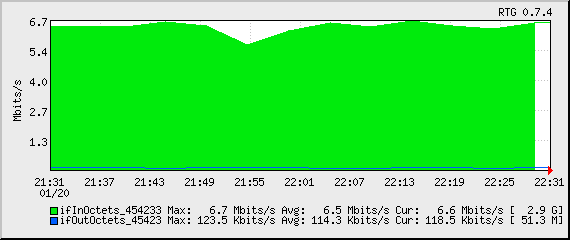
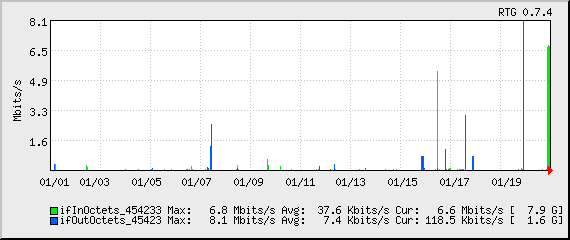
So grab it while it’s hot! (Read: grab it before I take the time to better throttle download speed.)