Archive for the 'php' Category


Duck Typing 2

I’m in fairly creative mood tonight, as evidenced by one (now two) blog postings, the PHP coding I did earlier, and the upload of some 75 random pictures to Facebook. I guess that’s what happens when I avoid the work I really should be doing. (Blech, JavaScript.)

Anyways, a few days ago a coworker mentioned something to me about duck typing, and I again decided to shirk my responsibilities and experiment. The basic idea is to stand typing on its head and have an imperative system rather than declarative — as they say, “if it walks like a duck, and quacks like a duck, it must be a duck.”

Read more »

Willfull Ignorance 2

Sometimes, writing good code is really hard. But other times, writing good code is so darn easy you shouldn’t even have to think about it. In fact, it shouldn’t even be called “good code” — in these cases there should never be anything else, so we’ll just call it “code”.

For instance, if I see another line of code that does this:

$foo = isset($foo) ? $foo : 'default value';

I think I’ll kill someone.

Let me clear something up for you: using the ternary operator does not make you cool. However, assigning a variable to itself makes you very uncool.

if (!isset($foo)) $foo = 'default value';

Now why is that so hard to write?

~Time 0

I’ve been playing around with Xubuntu on an old machine, and happened to install the latest version of Eclipse + PDT (1.0.3, IIRC?). While setting up the myriad of options I require to feel comfortable in the editor, I noticed that they’ve added the ability to strip whitespace on save. May the authors be praised!

Represent! 5

I just learned that I’ll be presenting at the 2008 installment of the DC PHP Conference (in Washington DC, oddly enough). I’m excited about the prospect.

Across an Instance 0

Here’s the quick PHP tip of the day: class methods can access the protected (of any shared ancestors) and private (of the same type) members of any instance, not only their own instance. That may sound confusing, but it’s really not so much.

Read more »

The PDT (Or: I Don’t Like Zend) 1

My animosity towards Zend has really increased lately, due to a number of factors (the recent ZendCon, their character when dealing with open-source projects, etc.), so much so that I’ve sworn off Zend products. Which doesn’t really sound like a difficult task at first glance, since I only use one Zend product — but that one product just happens to be one of the only good PHP IDEs out there: Zend Studio.

Fortunately (and if you follow the PHP world, you’ve probably heard about this), Studio is receiving competent competition in the open-source world from the Eclipse platform in the guise of the PHP Developer Tools, or PDT. (And that’s competition in a very liberal sense of the word, since Zend is actually backing PDT — so they can rip it of– base future versions of Zend Studio on it.)

Anyways, the real goal here was just to talk about a quick PDT tip (now that I’ve switched), not rant and rave about how Zend seems to have a knack for positioning themselves in the middle of hugely conflicting interests.

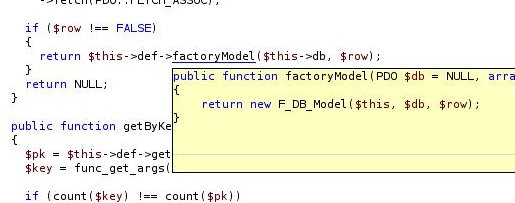
The tip: Most people know that you can Ctrl+Click “into” a function call. What I didn’t know is that you can also Ctrl+Hover to get a tooltip containing the first ~10 lines of the function.

blah.jpg

This can be immensely useful when you’re just trying to figure out what a piece of code does, without completely losing your train of thought and switching contexts.

Pressing WordPress 14

This post is designed to inspire our beloved server administrator to get some sort of caching installed.

So I finally decided that enough was enough and I wasn’t going to wait until I spontaneously combusted with the motivation to build my own blogging/CMS system and finish my site. Last night I downloaded Wordpress and began hacking my design into their template framework.

While testing it all out, I noticed that the responses seemed pretty slow. I wasn’t sure if it was the wireless network (I’d been wrangling with it a few hours earlier), so this evening I decided to do some benchmarking. I am something of a performance freak, after all. (So I lied about my intentions at the beginning of the post… who cares?) I’d already looked at some of the code (quite hideous, in my personal opinion), so I had a feeling things wouldn’t be pretty out of the box.

I was right: the default installation managed a measly 4 requests per second. First I installed APC, which, under Ubuntu, requires installing the PEAR and php5-dev packages, then running sudo pecl install apc. The addition of byte-code caching pushed it up to 13 requests/second. Clearly, the code was suffering from runtime — not compilation — issues.

I didn’t have any real desire to delve too deep into the code, so I opted for the prebuilt WP-Cache plugin. And this one was worth the money: just by enabling the plugin I jumped to nearly 500 requests/second. Note that this is a 125 times better than I started with. (Out of curiosity, I also ran with caching on and APC off; about 200 requests/second.)

In short: if you’re running WordPress and you can/have self respect (*grin*), install APC and WP-Cache.

Emerging XDebug 2.0.0 0

XDebug has finally (after ~4 years, according to their website) gone 2.0. Unfortunately, there’s no ebuild for the new version in Gentoo’s Portage. Luckily, they’re really easy to create, as all you have to do is change the name of the file.

The only trick, however, is that you’ll want to set it up in a portage overlay. But this is easy to setup, too.

Creating an Overlay

I created my overlay in /usr/local/portage; it gives me a convenient place to store hacked up ebuilds (like this one). First, create the directory:

# mkdir /usr/local/portage
# cd /usr/local/portage

Now you need to add this directory to the PORTDIR_OVERLAY variable in /etc/make.conf. Multiple values are separated by spaces.

Building the eBuilds

# cd /usr/local/portage/
# mkdir dev-php5
# cd dev-php5
# mkdir xdebug
# cp /usr/portage/dev-php5/xdebug/xdebug-2.0.0-rc4.ebuild ./xdebug-2.0.0.ebuild
# ebuild ./xdebug-2.0.0.ebuild digest

It also depends on your xdebug-client package being the same version, so create one of those as well:

# cd /usr/local/portage/
# mkdir dev-php
# cd dev-php
# mkdir xdebug-client
# cp /usr/portage/dev-php/xdebug-client/xdebug-client-2.0.0-rc4.ebuild ./xdebug-client-2.0.0.ebuild
# ebuild ./xdebug-client-2.0.0.ebuild digest

Done

And now you should be ready to emerge the package like usual!

Including benchmarks 3

As part of the namespace discussion, the performance difference between including multiple files and concatenating those files into a single file, mainly because of the aforementioned limitation.

In response to an argument for concatenation, Rasmus Lerdorf (original author of PHP) said:

Note that what you are saving by combining the files into one is just a single stat syscall per file. And that can be alleviated by setting apc.stat=0 in your config. That of course means you need to restart your server or flush your cache whenever you want to update the files. In apc.stat=0 mode you gain nothing by merging all the files.

Now, I’d always theorized that concatenation could a present measurable performance increase, so I was a little muffed by this statement. Consequently, I ventured forth to prove this out.

Setup

First, I generated 100 files each containing a single class. The files and classes were named consecutively, 1-100. I then created one script that dynamically included each file, another that statically included each file, and one that contained all of the files concatenated together. I used Apache Bench and had APC enabled. I ran one set of tests with apc.stat=0 and one with apc.stat=1. The tests were run on a AMD Sempron 2600+ with 512MB of RAM, running Apache 2.0.58 with mpm-prefork and PHP 5.1.6.

Results

I was a little surprised by the results. Because they were better than I’d ever theorized: even with apc.stat=0, the concatenated file request times were less than half those of the static list.

Dynamic

Requests per second:    247.86 [#/sec] (mean)
Time per request:       40.346 [ms] (mean)

Static

Requests per second:    279.86 [#/sec] (mean)
Time per request:       35.732 [ms] (mean)

Concatenated

Requests per second:    605.07 [#/sec] (mean)
Time per request:       16.527 [ms] (mean)

Also of note: the dynamic includes didn’t really lose by much to the static includes. That should make people using __autoload (like me, at work) happy (it does).

Apparently, there’s still some performance to be gained by concatenating your libraries into a single file, even with a byte-code cache. Now, granted, you may not always include 100 files, or your entire library. However, by analyzing your usage patterns, you could always create a single file containing the classes you use the most, and leave those only occasionally used to your autoload implementation.

Solving the wrong problem 0

I’m going to apologize in advance for bringing this up again, but there’s been more talk on the php.internals list about the namespace patch that was applied to PHP 6. And somewhere in the discussion (erm, I think discussion implies that there are two opinions given equal weight), someone linked to the original post that started this round.

Main assumption of the model is that the problem that we are to solve is the problem of the very long class names in PHP libraries.

Suddenly, I realized what was wrong: they set out to solve the wrong problem!

Namespaces reduce typing? No. Namespaces allow the same symbol to be used in two contexts. Importing a namespace, thereby saving keystrokes, is just a nice (and popular) addition.

I’m not giving up hope, though. Maybe, just maybe, one of us will cut through the fog.

Next Page »